AltarDocker
Deploy MongoDB, MinIO, Omniboard, and AltarExtractor with Docker Compose.
Web app to connect to your MongoDB experiments and open Omniboard in one click.
Open your Sacred experiment databases in Omniboard via a simple web interface.
Download the latest platform-specific launcher from GitHub Releases and run it.
pip install -r requirements.txt
python -m src.main
Run the Python application directly from the AltarViewer source code.
docker pull alienor134/altarviewer:latest
docker run -d \
  -p 8060:8060 \
  -v /var/run/docker.sock:/var/run/docker.sock \
  -e MONGO_DEFAULT_URL="mongodb://:27017/" \
  --name altarviewer \
  alienor134/altarviewer:latest
Run the standalone AltarViewer Docker image. Replace <mongo-host> with the hostname where MongoDB is reachable from the container (for example host.docker.internal on Docker Desktop).
docker compose -f path/to/your/folder/docker-compose_default.yml up -d
Use the AltarDocker stack to bring up MongoDB and MinIO with Docker Compose, then connect AltarViewer to that MongoDB instance.
Once AltarViewer is running, open http://localhost:8060 in your browser to access the web interface.
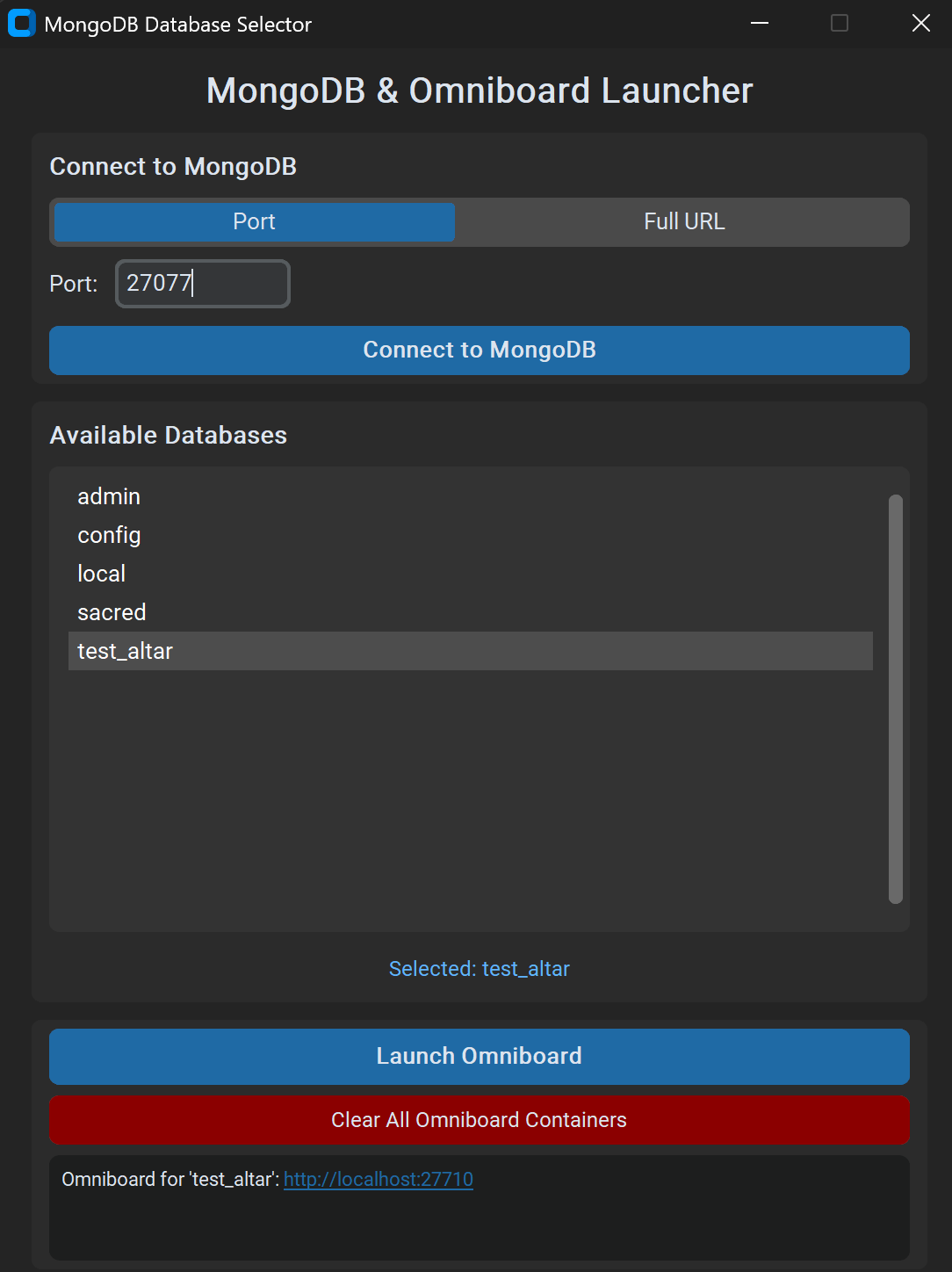
Choose between connecting by port (default: 27017) or by full MongoDB URL, then click Connect to list databases.
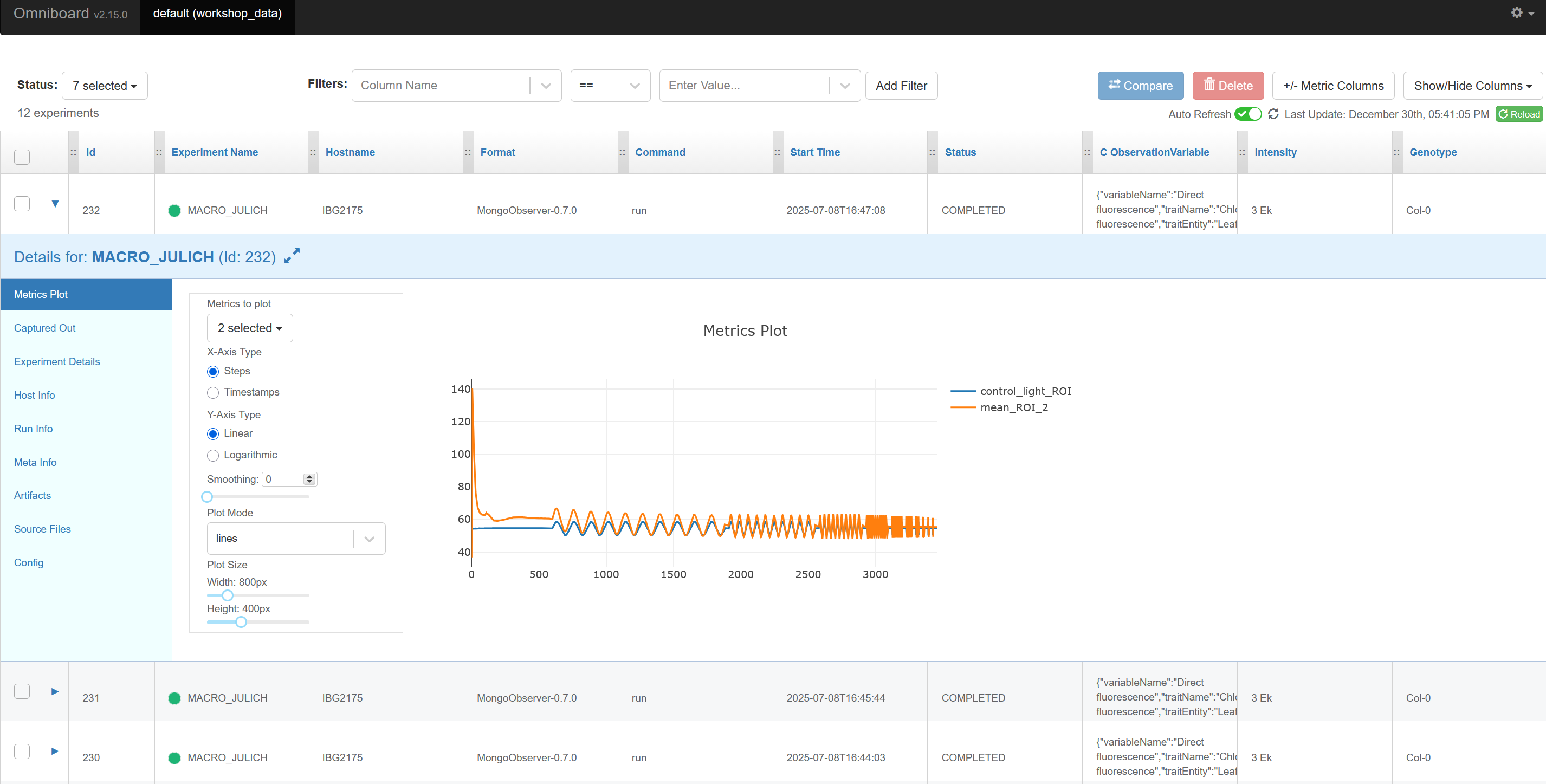
Select a database and click Launch Omniboard. Open Omniboard using the links shown in the AltarViewer UI.
Deploy MongoDB, MinIO, Omniboard, and AltarExtractor with Docker Compose.
Browse and filter Sacred experiments with a modern web UI.
Send experiments to Sacred and artifacts to MinIO.



A graphical user interface application for launching and managing Omniboard instances to visualize and track MongoDB-backed experiments from the DREAM/Altar ecosystem.
docker –version
You can use any of these options:
Download the latest platform-specific launcher from the AltarViewer releases and run it.
git clone https://github.com/DreamRepo/Altar.git
cd Altar/AltarViewer
python -m venv venv

# Activate the venv (one of these)
venv\Scripts\activate      # Windows
source venv/bin/activate    # macOS/Linux

pip install -r requirements.txt
python -m src.main
docker pull alienor134/altarviewer:latest
docker run -d \
  -p 8060:8060 \
  -v /var/run/docker.sock:/var/run/docker.sock \
  -e MONGO_DEFAULT_URL="mongodb://<mongo-host>:27017/" \
  --name altarviewer \
  alienor134/altarviewer:latest
Replace <mongo-host> with the host where MongoDB is reachable from the container (for example host.docker.internal on Docker Desktop).
Use AltarDocker to spin up MongoDB and MinIO, then point AltarViewer to that MongoDB:
git clone https://github.com/DreamRepo/AltarDocker.git
cd AltarDocker
docker compose -f docker-compose_default.yml up -d
Then start AltarViewer via option 1–3 and connect it to the MongoDB instance from the stack (for example mongodb://localhost:27017).
Launch the application (using any install option above)
localhost:27017)git clone https://github.com/DreamRepo/Altar.git
cd Altar/AltarViewer
python -m venv venv
source venv/bin/activate # or venv\Scripts\activate on Windows
pip install -r requirements.txt
pip install -r requirements-dev.txt
# Run all tests
pytest

# Run with coverage
pytest --cov=src --cov-report=html

# Run specific test file
pytest tests/test_mongodb.py

# Run with verbose output
pytest -v
Build a standalone executable using PyInstaller:
# Install PyInstaller (if not in requirements-dev.txt)
pip install pyinstaller

# Build executable
pyinstaller OmniboardLauncher.spec

# Output will be in dist/ directory
Edit OmniboardLauncher.spec to customize:
AltarViewer/
├── src/
│   ├── main.py          # Application entry point
│   ├── gui.py           # GUI implementation (CustomTkinter)
│   ├── mongodb.py       # MongoDB connection logic
│   └── omniboard.py     # Docker/Omniboard management
├── tests/
│   ├── conftest.py      # Pytest configuration
│   ├── test_mongodb.py  # MongoDB tests
│   └── test_omniboard.py # Omniboard tests
├── assets/              # Images and resources
├── requirements.txt     # Production dependencies
├── requirements-dev.txt # Development dependencies
└── OmniboardLauncher.spec # PyInstaller specification
The application uses a deterministic hash-based port assignment:
port = 20000 + (SHA256(database_name) % 10000)
This ensures:
We welcome contributions! Please follow these guidelines:
git clone https://github.com/YOUR_USERNAME/Altar.git
cd Altar/AltarViewer
git checkout -b feature/your-feature-name
pytest
git add .
git commit -m "feat: add your feature description"
Use Conventional Commits:
feat: New featurefix: Bug fixdocs: Documentation changestest: Test additions or changesrefactor: Code refactoringchore: Maintenance tasksgit push origin feature/your-feature-name
Problem: “Connection Error” when connecting to MongoDB
Solutions:
mongosh or mongoProblem: Docker-related errors when launching Omniboard
Solutions:
docker psProblem: “Port already in use” errors
Solutions:
docker ps
docker stop <container_id>
Note: Each database consistently uses the same port (hash-based), allowing your browser to remember Omniboard customizations and preferences per database
Problem: Missing module errors when running from source
Solutions:
pip install -r requirements.txtgit tag -a v1.0.0 -m "Release version 1.0.0"git push origin v1.0.0This project is licensed under the GNU General Public License v3.0 - see the LICENSE file for details.